
package.json
module 作为第三方的API这一步需要配置 模块名/入口
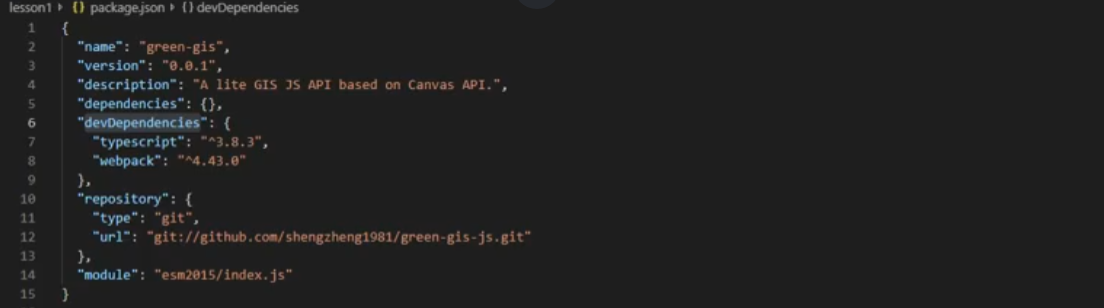
npm install 安装依赖
npm install -g 全局安装 运行依赖
npm install -save 对当前程序安装 运行依赖
npminstall -save -dev 安装开发时的依赖
在创建JavaScript模块时,export 语句用于从模块中导出实时绑定的函数、对象或原始值,以便其他程序可以通过 import 语句使用它们。
1
2
3
4
5
6
7
8
9
10
11
12
13
14
15
16
17
18
19
20
21
22
23
24
25
26
27
// 导出单个特性
export let name1, name2, …, nameN; // also var, const
export let name1 = …, name2 = …, …, nameN; // also var, const
export function FunctionName(){...}
export class ClassName {...}

// 导出列表
export { name1, name2, …, nameN };

// 重命名导出
export { variable1 as name1, variable2 as name2, …, nameN };

// 解构导出并重命名
export const { name1, name2: bar } = o;

// 默认导出
export default expression;
export default function (…) { … } // also class, function*
export default function name1(…) { … } // also class, function*
export { name1 as default, … };

// 导出模块合集
export * from …; // does not set the default export
export * as name1 from …; // Draft ECMAScript® 2O21
export { name1, name2, …, nameN } from …;
export { import1 as name1, import2 as name2, …, nameN } from …;
export { default } from …;
ts编译
如果可以用ts库,tsc
如果ts库不是全局安装又安装了nodejs,npx tsc
webpack未全局安装
https://blog.csdn.net/weixin_43167459/article/details/105032112
set-executionpolicy remotesigned
入口文件
方便引用
body onload
window.onload
window.load
js里的window指整个页面,所有JS全局对象、函数以及变量均自动成为windows对象的成员
网页中的某些JavaScript脚本代码往往需要在文档加载完成后才能够去执行,否则可能导致无法获取对象的情况,为了避免类似情况的发生,可以使用以下两种方式:
(1).将脚本代码放在网页的底端,运行脚本代码的时候,可以确保要操作的对象已经加载完成。
(2).通过window.onload来执行脚本代码。

webpack
object与any